
The notification bell
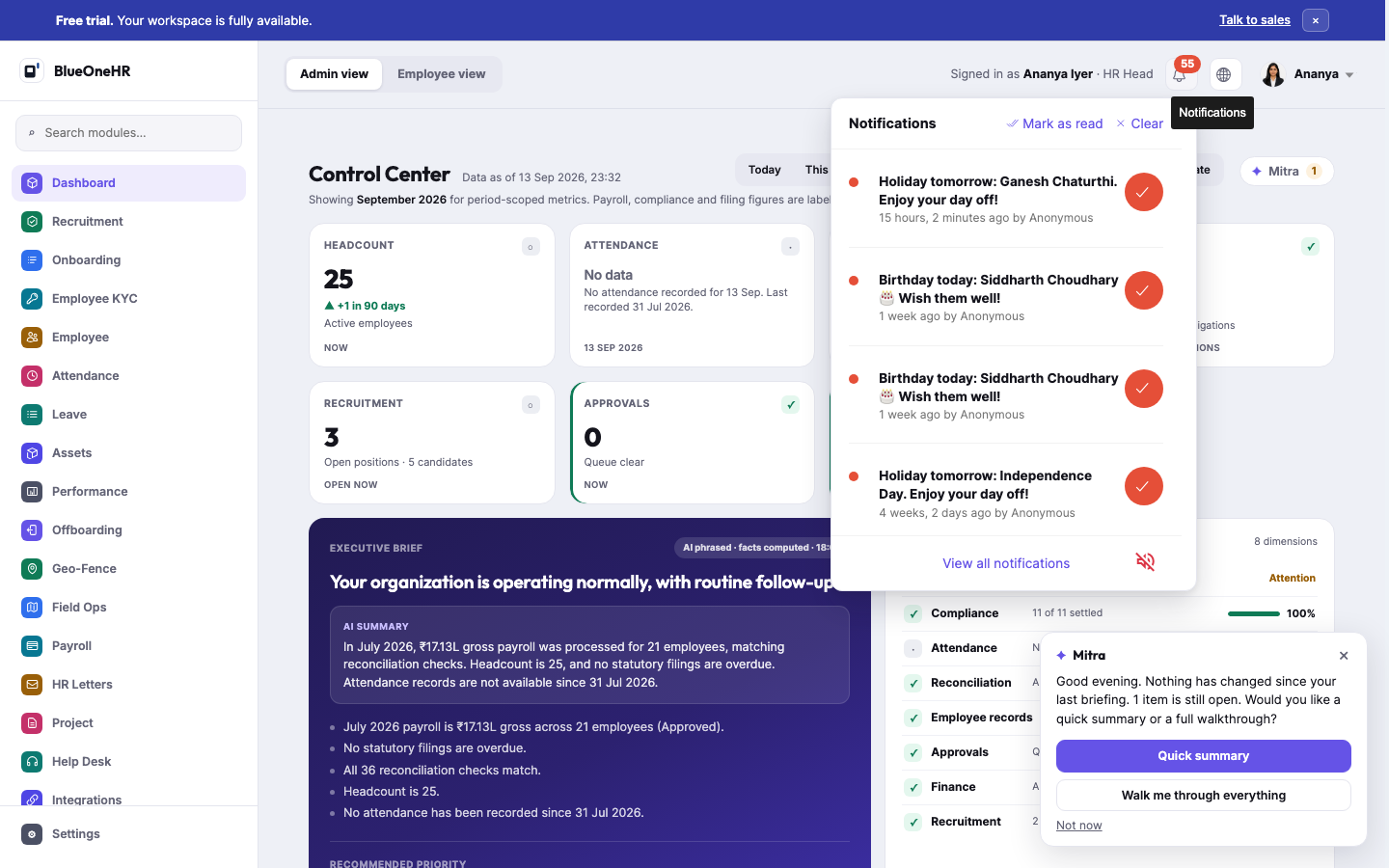
Every signed-in page carries a bell icon in the top bar. Clicking it opens a dropdown tray of recent notifications, separate from any per-module inbox. The tray shown here is the one an HR Head sees on the demo workspace.
What the tray shows
Selecting the bell opens a tray headed Notifications. At its top right are two links, Mark as read and Clear. Each row has a red dot, the notification text, and how long ago it happened followed by who raised it. The check button at the right of a row is round and orange-red.
On the demo workspace the first rows held holiday reminders ("Holiday tomorrow: Ganesh Chaturthi. Enjoy your day off!") and birthday reminders ("Birthday today: ... Wish them well!"), each attributed to Anonymous. Further down, other kinds of row appeared: "New announcement:" followed by a title, "Your leave request has been approved", "Your attendance request for" a date "is validated", "Your work details has been updated" and "You have been mentioned in an announcement". Some of these rows were attributed to a named user rather than Anonymous. Opening the tray does not change the badge number.
At the bottom of the tray are a View all notifications link and a speaker icon with a slash through it.
How many items the tray holds
The number on the bell matches the number of items in the tray. The dropdown is a scrolling area that shows a few items at a time, so you scroll inside the tray to reach the rest. On the demo workspace the badge showed 47 and the tray held 47 rows, each with a red dot; the capture above shows just the top of the list.
Not the same thing as a Mitra briefing
The screenshot above happened to be taken at the same moment a separate Mitra briefing dialog was open in the bottom-right corner of the screen ("Good evening. Nothing has changed since your last briefing..."). These are two independent features that can be on screen simultaneously: the notification bell is a conventional activity feed (holidays, birthdays, and similar events); Mitra's dialog is a computed operational briefing. See What Mitra is for the latter — do not conflate the two when writing about either.
Not confirmed
- What Mark as read and Clear do to the badge and the list was not tried.
- What View all notifications opens was not confirmed, and neither was what the speaker icon changes.
- Whether a row opens the item it describes was not tried.
No comments to display
No comments to display