
Setting up leave types
Leave Types is where an administrator defines the categories of leave your organisation offers, found under Leave → Leave Types. Verified live on demo.blueonehr.com, 2026-09-13, signed in as an HR Head.
What a leave type carries
Each type has a name, whether it is Paid or unpaid, a Total Days allowance, whether unused days Carry Forward to the next period, and whether it is Compensatory (earned in exchange for something, such as working a holiday, rather than granted upfront). Create Leave Type, Edit, Assign, and Delete are the available actions per type.
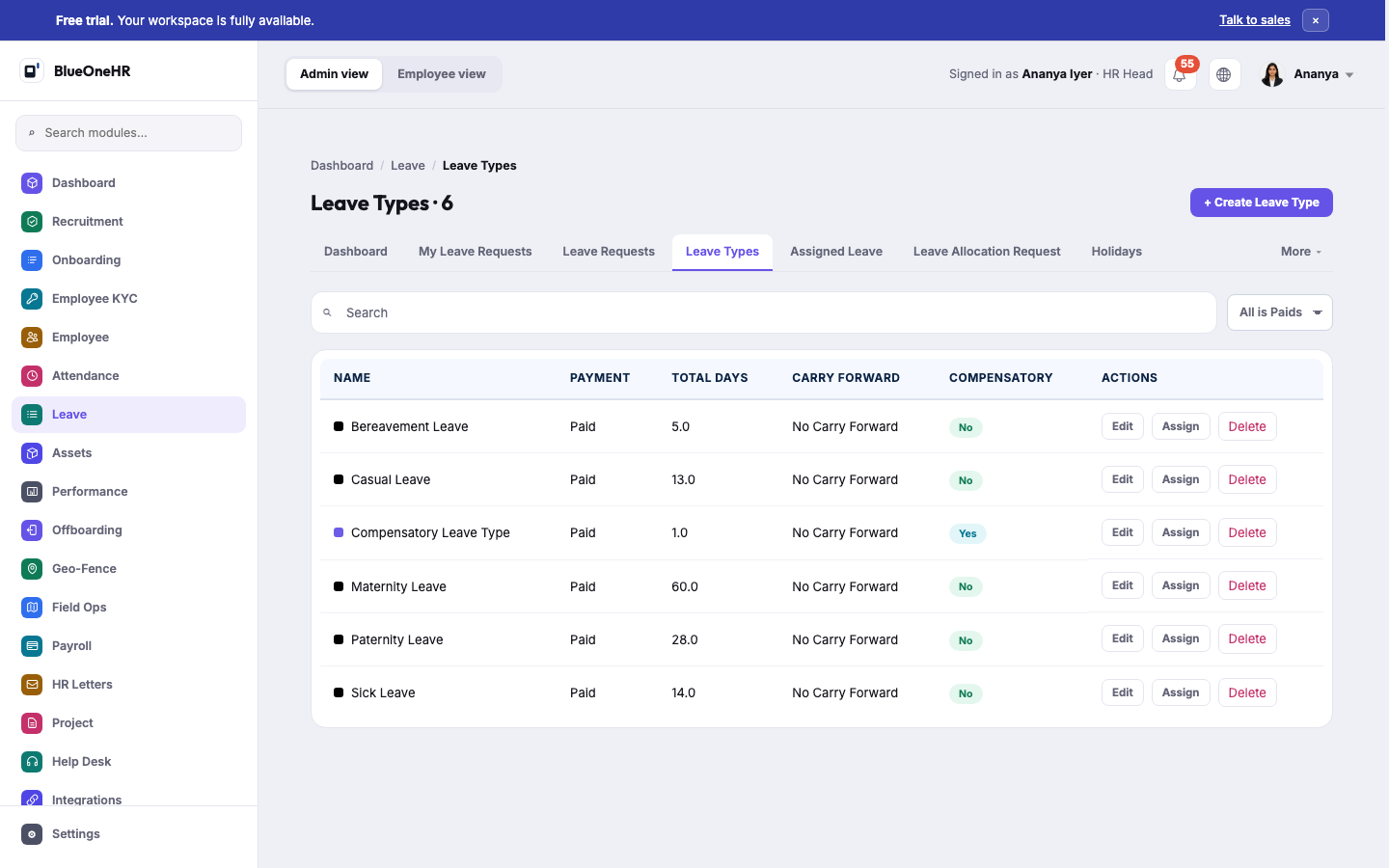
What was actually configured on the demo workspace
Six leave types existed, all Paid, none carrying forward unused days:
| Type | Total days | Compensatory |
|---|---|---|
| Bereavement Leave | 5.0 | No |
| Casual Leave | 13.0 | No |
| Compensatory Leave Type | 1.0 | Yes |
| Maternity Leave | 60.0 | No |
| Paternity Leave | 28.0 | No |
| Sick Leave | 14.0 | No |
These are this workspace's own configuration, not a fixed product default — see How leave works for the standing caution against assuming every organisation offers the same leave types with the same allowances. Only Compensatory Leave Type was marked Compensatory; the rest are granted upfront rather than earned.
No comments to display
No comments to display