
Attendance on the mobile app
The Attendance tab in the mobile app is where most people record their working time, day to day.
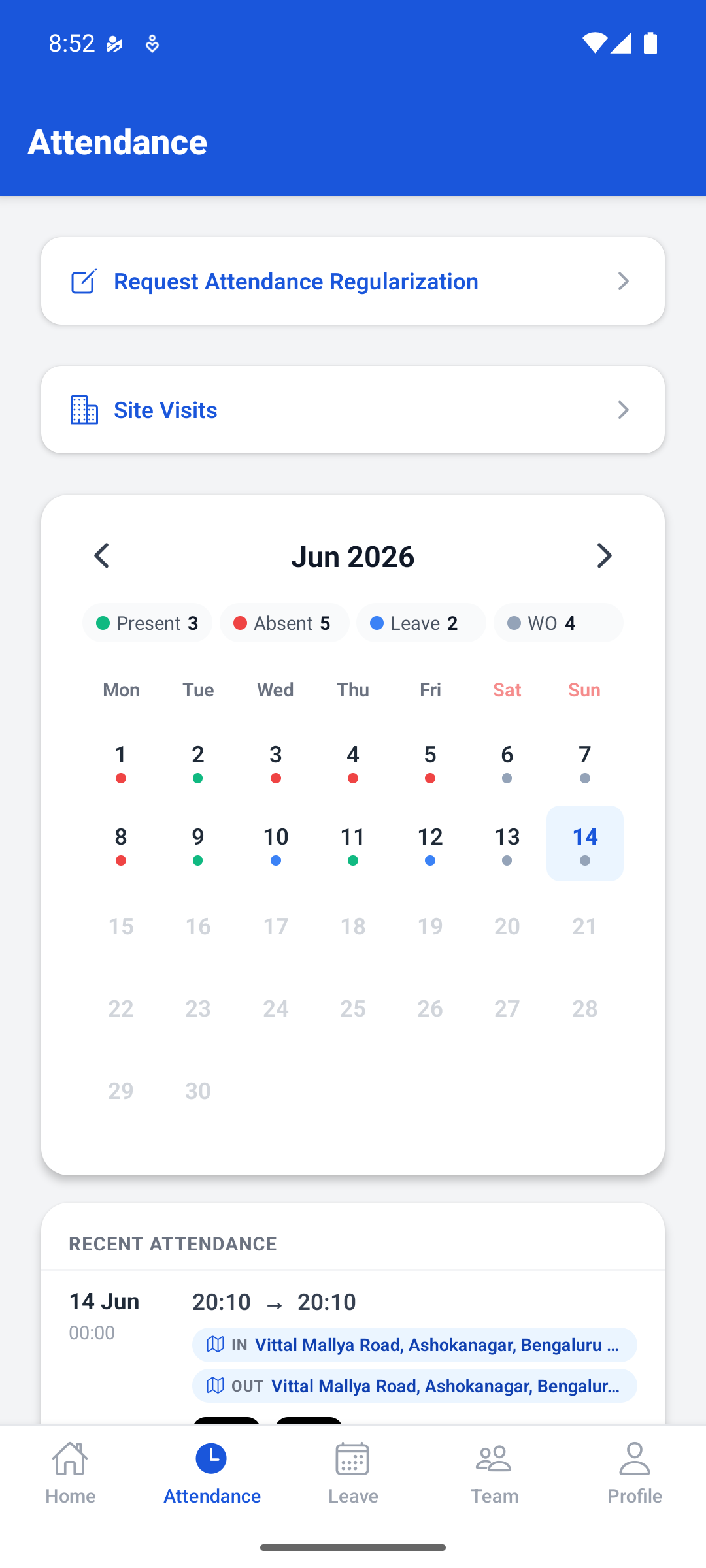
The month at a glance
The calendar summarises the current month, with a count of the days that were Present, Absent, on Leave, or a weekly off (WO). Each day carries a coloured dot so you can see the shape of the month without reading a table.
Move between months with the arrows either side of the month name.
Recent attendance
Below the calendar, the most recent days are listed with the times recorded for them.
Where the app captured a location for a punch, the place is shown against IN and OUT. This is a record of where the punch was made, not a judgement about it. How locations are checked against fences is in How geo-fencing works.
Requesting a correction
Request Attendance Regularization at the top of the tab raises a correction for a day whose record is wrong. It goes to the same review queue as a correction raised on the web; see Requesting a correction.
Site visits
If your role involves working away from your usual place of work, Site Visits records those trips. It is separate from your ordinary daily attendance.
If a punch does not appear
Give it a moment and pull the screen to refresh: the app and the web share one record, so anything recorded on your phone should appear in a browser too.
If it is still missing, raise a correction rather than clocking in a second time. A duplicate punch is harder for HR to unpick than a missing one.
No comments to display
No comments to display