
Pay Components
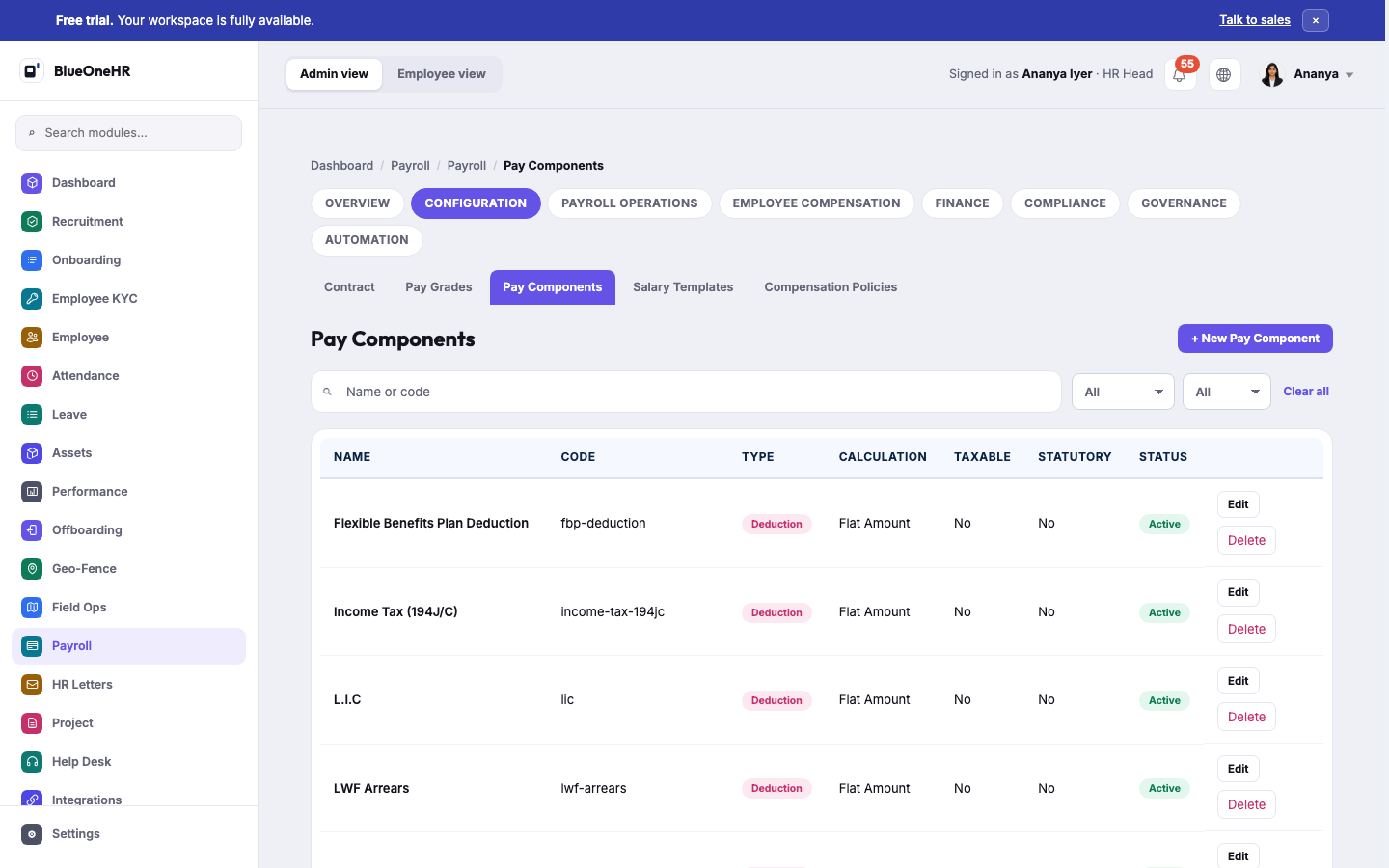
A Pay Component is a single named line that can appear on a payslip — an allowance or a deduction. Found under Payroll → Configuration → Pay Components. Verified live on demo.blueonehr.com, 2026-09-13.
What a component carries
Each component has a name, a short code, a type (Deduction or, presumably, Allowance — only Deduction-type components were visible in the first page of results), a calculation method (e.g. Flat Amount), whether it is Taxable, whether it is Statutory, and a status. Real components seen on the demo workspace include Flexible Benefits Plan Deduction, Income Tax (194J/C), L.I.C, and LWF Arrears — all Deductions, all Flat Amount, all non-taxable and non-statutory as configured here.
Not the same as statutory deductions in the payslip engine
None of the components observed here were marked Statutory, and the underlying payslip engine's own PF/ESI/PT/TDS statutory calculations are documented separately as part of the platform's compliance engine, not as Pay Components. Do not assume every deduction on a payslip traces back to a row in this screen — some are computed by the statutory engine directly. This distinction was not fully explored in this pass and deserves a closer look before being stated more precisely.
Related
- Salary Templates group components together via Manage Components.
- Payslips is where these components (and statutory deductions) show up as actual line items for a real employee.
No comments to display
No comments to display