
Salary Templates
A Salary Template bundles Pay Components together against a Pay Grade, so a contract can be built from a reusable template rather than assembled by hand every time. Found under Payroll → Configuration → Salary Templates. Verified live on demo.blueonehr.com, 2026-09-13.
What a template carries
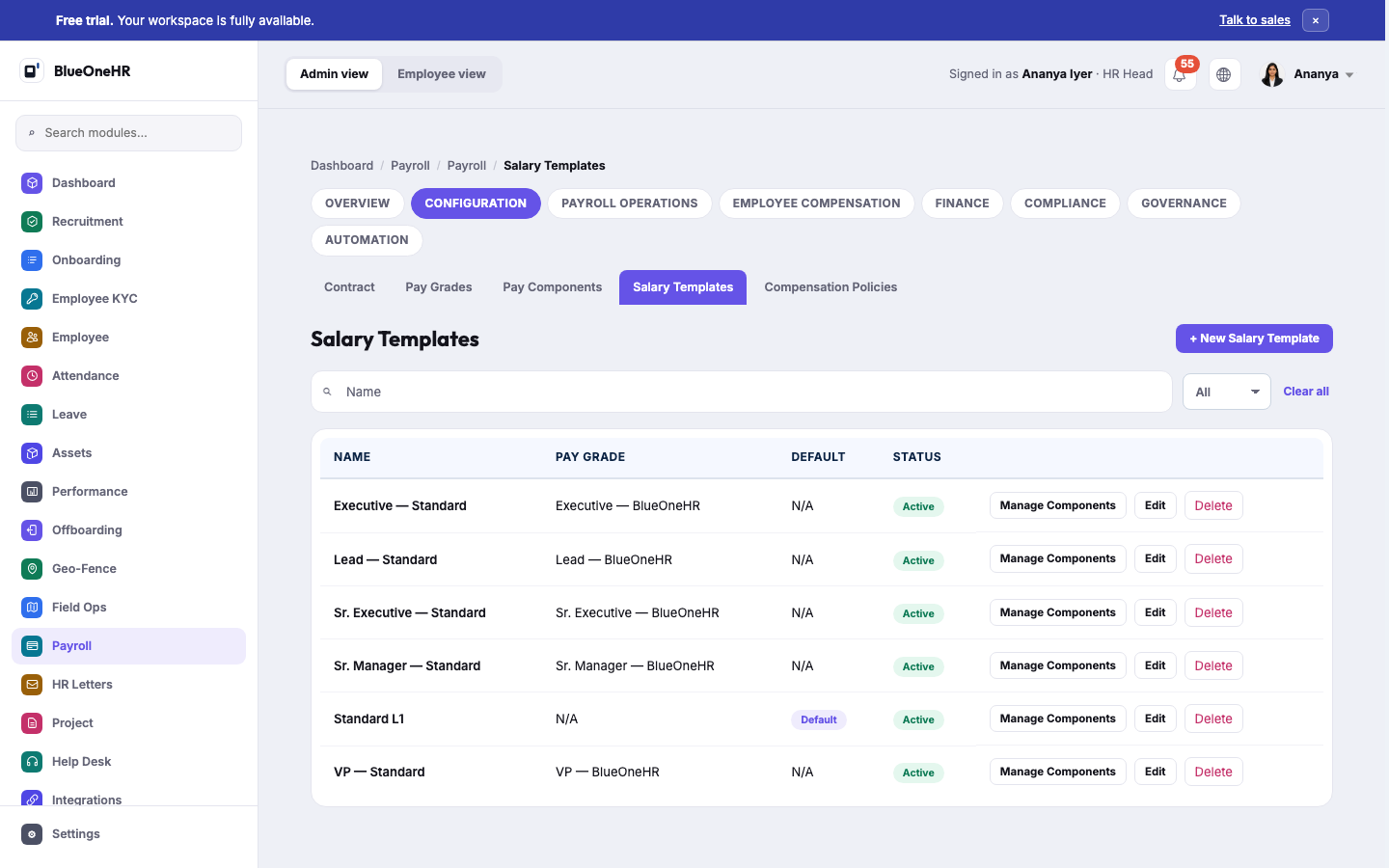
Each template has a name, an optional Pay Grade it is tied to, whether it is the Default template, a status, and a Manage Components action that opens its component list. On the demo workspace, six templates existed: Executive — Standard, Lead — Standard, Sr. Executive — Standard, Sr. Manager — Standard, VP — Standard (each tied to the matching Pay Grade), and Standard L1 — the one marked Default, with no Pay Grade attached.
The default template has no grade
Standard L1 is the Default template and is the only one without a Pay Grade — worth noting precisely because it means "default" and "has a grade" are independent properties here, not the same thing. Do not assume a default template must correspond to an entry-level grade; on this workspace it deliberately did not carry one at all.
Related
- Pay Grades — what a template can be tied to.
- Pay Components — what Manage Components attaches to a template.
- Compensation Policies — where a template is actually put into effect.
No comments to display
No comments to display